Chapter 07 of 40
GuiExpert Table in React
The same model, rendered by the React wrapper – with stable props via useMemo.
After this chapter you can
- render <GuiexpertTable> in React
- keep model and options stable
- react to events with callback props
One core, thin wrappers
Every framework package is a thin layer over the core: it creates the TableScope of
chapter 5 (First table), passes your model and options, and turns the table events into the idiom of the
framework – callback props in React.
Install
npm i @guiexpert/table @guiexpert/react-tableimport "@guiexpert/table/css/main.css";The component
The demo shows the shared orders model (the same as in chapter 6) and toggles between 100,000 and 1,000 rows:
// Episode 007 – the same orders model, rendered by the React wrapper.import { ComponentRendererWrapper, GuiexpertTable } from "@guiexpert/react-table";import { GeMouseEvent, TableApi, TableOptions } from "@guiexpert/table";import { useMemo, useState } from "react";import { createOrderTableModel } from "./model/order-table";import { StatusChip } from "./StatusChip";
export function App() {  const [rows, setRows] = useState(100_000);  const [info, setInfo] = useState("");
  // a NEW model object rebuilds the table → keep model and options stable  const model = useMemo(() => createOrderTableModel(rows, {    status: new ComponentRendererWrapper(StatusChip)            // episode 026: React component per cell  }), [rows]);  const options = useMemo(() => ({ ...new TableOptions() }), []);
  const onReady = (api: TableApi) =>    setInfo(`${api.getBodyModel().getRowCount().toLocaleString("en")} orders`);  const onClick = (evt: GeMouseEvent) =>    setInfo(`row ${evt.rowIndex}, column ${evt.columnIndex}`);
  return (    <>      <header className="app-header">        <b>React</b>        <button onClick={() => setRows(rows === 100_000 ? 1_000 : 100_000)}>          {rows === 100_000 ? "1,000 rows" : "100,000 rows"}        </button>        <span id="info">{info}</span>      </header>      <div className="table-div">        <GuiexpertTable          tableModel={model} tableOptions={options}          tableReady={onReady} mouseClicked={onClick}        />      </div>    </>  );}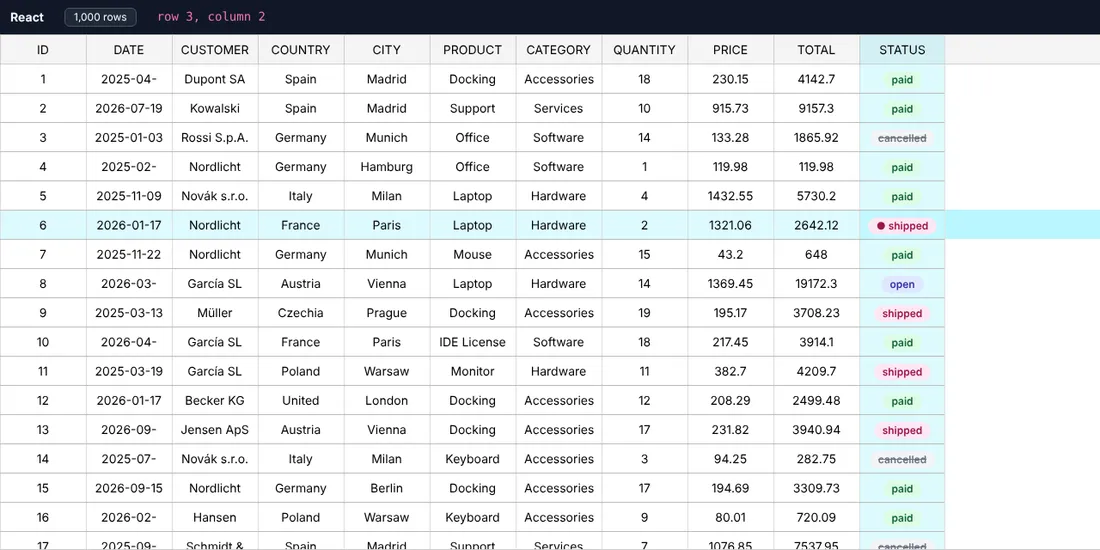
Rules for React
- A new
tableModelortableOptionsobject rebuilds the table (the wrapper usesuseEffect([tableModel, tableOptions])). Create both withuseMemo– otherwise every re-render of your component throws the table away, including scroll position and selection. - Callback props:
tableReady,mouseClicked,selectionChanged,contextmenu,modelChanged,checkboxChanged,scroll… The callbacks may change on every render. tableReadyhands you theTableApi– keep it in auseRefif buttons need it.- The wrapper fills its parent (100 % × 100 %) – the parent needs a height.
React components inside cells
ComponentRendererWrapper turns a React component into a cell renderer – with working hooks. That is the
topic of chapter 26 (Components as cells).
Next
The same model in chapter 8 (Vue 3).