Chapter 06 of 40
Without a framework: Web Component and CDN
The table as a custom element – in any HTML page, even without npm and a build step.
After this chapter you can
- use <guiexpert-table> in a plain page
- listen to bubbling CustomEvents
- load everything from a CDN
The table as a custom element
@guiexpert/webcomponent-table wraps the core into a standard Web Component. It works in every HTML page –
and inside any framework that can render custom elements.
npm i @guiexpert/table @guiexpert/webcomponent-table<!doctype html><html lang="en" data-theme="light"><head> <meta charset="utf-8" /> <title>Episode 006 – Web Component</title> <link rel="stylesheet" href="../src/style.css" /></head><body> <header class="app-header"><b>Web Component</b> <span id="info"></span></header> <guiexpert-table class="table-div" style="display: block"></guiexpert-table> <script type="module" src="./main.ts"></script></body></html>// Episode 006 – the table as a custom element: works in any HTML page and any framework.import "@guiexpert/table/css/main.css";import { GuiexpertTable } from "@guiexpert/webcomponent-table";import { TableApi, TableOptions } from "@guiexpert/table";import { createOrderTableModel } from "./model/order-table";
function showInfo(api: TableApi): void { const rows = api.getBodyModel().getRowCount(); document.querySelector("#info")!.textContent = `${rows.toLocaleString("en")} orders`;}
const tableModel = createOrderTableModel();const tableOptions = { ...new TableOptions() };
// the package does not register the element itself; events are bubbling CustomEventscustomElements.define("guiexpert-table", GuiexpertTable);const table = document.querySelector<GuiexpertTable>("guiexpert-table")!;table.addEventListener("tableReady", (e) => { const api = (e as CustomEvent<TableApi>).detail; showInfo(api);});table.data = { tableModel, tableOptions };
The model is the one every framework demo of this training uses – a function that turns orders into a
TableModelIf with TableFactory.createTableModel():
import { CellRendererIf, ColumnDef, TableFactory, TableModelIf } from "@guiexpert/table";import { createOrders, Order } from "../data/orders";
/** * The orders table used by the framework demos (episodes 006–010) – one model for every framework. * Episode 026: optional body renderers per property, e.g. a framework component for "status". */export function createOrderTableModel(  rowCount = 100_000,  bodyRenderers: Partial<Record<keyof Order, CellRendererIf>> = {}): TableModelIf {
  const rows = createOrders(rowCount);  if (!Object.keys(bodyRenderers).length) return TableFactory.createTableModel({ rows });
  const properties = Object.keys(rows[0] ?? {}) as (keyof Order)[];  const columnDefs = properties.map(property => ColumnDef.create({    property, headerLabel: property.toUpperCase(), bodyRenderer: bodyRenderers[property]  }));  return TableFactory.createTableModel({ rows, columnDefs });}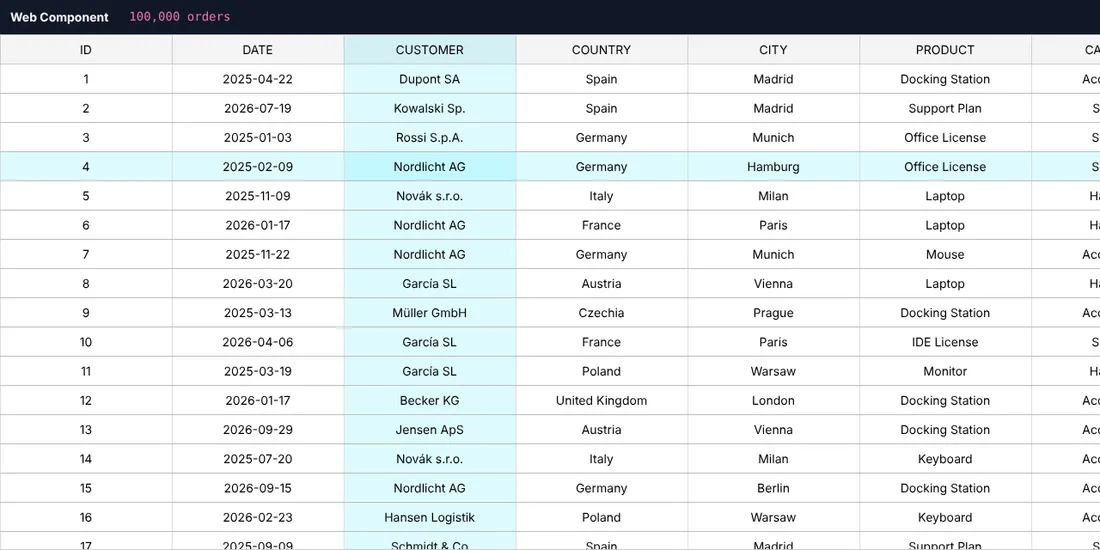
<guiexpert-table>.Three rules
- Register the element yourself:
customElements.define("guiexpert-table", GuiexpertTable). The package does not do it, so you can choose the tag name. - Give it
display: blockand a height – a custom element isinlineby default. - Listen first, then set
data:tableReadyfires right away when the data is set.
All events (tableReady, mouseClicked, selectionChanged …) arrive as
bubbling CustomEvents – except contextmenu, which does not bubble: listen on the
element itself. The payload is in event.detail. For tableReady it is the
TableApi.
Without npm and without a build step
A single HTML file is enough – stylesheet and modules come from jsDelivr, an import map resolves the bare package names:
<!doctype html><!-- Episode 006 – no npm, no build: the table straight from a CDN (open this file via any web server). --><html lang="en" data-theme="light"><head> <meta charset="utf-8" /> <title>Episode 006 – GuiExpert Table from a CDN</title> <link rel="stylesheet" href="https://cdn.jsdelivr.net/npm/@guiexpert/table@1.1.86/css/main.css" /> <script type="importmap"> { "imports": { "@guiexpert/table": "https://cdn.jsdelivr.net/npm/@guiexpert/table@1.1.86/index.js", "@guiexpert/webcomponent-table": "https://cdn.jsdelivr.net/npm/@guiexpert/webcomponent-table@1.1.86/index.js" } } </script> <style>body { margin: 0; font: 14px system-ui, sans-serif; } guiexpert-table { display: block; height: 100vh; }</style></head><body> <guiexpert-table></guiexpert-table> <script type="module"> import { GuiexpertTable } from "@guiexpert/webcomponent-table"; import { TableFactory, TableOptions } from "@guiexpert/table"; customElements.define("guiexpert-table", GuiexpertTable); const rows = [{ id: 1, city: "Berlin" }, { id: 2, city: "Paris" }]; const tableModel = TableFactory.createTableModel({ rows }); const table = document.querySelector("guiexpert-table"); table.data = { tableModel, tableOptions: { ...new TableOptions() } }; </script></body></html>Next
Part 3 shows the wrappers for chapter 7 (React), chapter 8 (Vue 3), chapter 9 (Angular 14–22) and Svelte, Solid and Preact – always with the same model.