Chapter 29 of 40
Rowspan and colspan: a timetable
Connected cells come from the model – double periods span rows, breaks span the week.
After this chapter you can
- return spans from getRowspanAt / getColspanAt
- colour cells by class
- know how spans render
Spans come from the model
Like values and classes, spans are answers of the area model: AreaModelIf.getRowspanAt() and
AreaModelIf.getColspanAt() return how many rows resp. columns a cell covers – 1 is normal.
import { AreaModelArrayOfArrays } from "@guiexpert/table";
export const DAYS = ["Monday", "Tuesday", "Wednesday", "Thursday", "Friday"];
const TIMETABLE: string[][] = [  ["08:00", "Math", "German", "English", "Physics", "Art"],  ["08:45", "Math", "German", "English", "Physics", "Art"],  ["09:30", "Biology", "Math", "History", "Chemistry", "Music"],  ["10:15", "Break", "", "", "", ""],  ["10:35", "English", "Sports", "Math", "German", "Computer Science"],  ["11:20", "English", "Sports", "Math", "German", "Computer Science"],  ["12:05", "Lunch", "", "", "", ""],  ["13:00", "Chemistry", "Computer Science", "Sports", "Math", "Project"],  ["13:45", "Ethics", "Computer Science", "Sports", "History", "Project"]];
export class TimetableModel extends AreaModelArrayOfArrays<string> {  constructor(rows: string[][] = TIMETABLE) {    super("body", rows, 44);  }
  private isBreak(rowIndex: number): boolean {    return ["Break", "Lunch"].includes(this.getValueAt(rowIndex, 1));  }
  // a break row: one cell over all five days  override getColspanAt(rowIndex: number, columnIndex: number): number {    return this.isBreak(rowIndex) && columnIndex === 1 ? DAYS.length : 1;  }
  // the same subject in consecutive periods: one tall cell (only the FIRST cell of a block spans)  override getRowspanAt(rowIndex: number, columnIndex: number): number {    if (columnIndex === 0 || this.isBreak(rowIndex)) return 1;    const at = (row: number) => this.getValueAt(row, columnIndex);    if (rowIndex > 0 && at(rowIndex) === at(rowIndex - 1)) return 1;      // covered by the cell above    let span = 1;    while (rowIndex + span < this.getRowCount() && at(rowIndex + span) === at(rowIndex)) span++;    return span;  }
  // a colour per subject (CSS classes)  override getCustomClassesAt(rowIndex: number, columnIndex: number): string[] {    if (columnIndex === 0) return ["tt-time"];    if (this.isBreak(rowIndex)) return ["tt-break"];    const subject = String(this.getValueAt(rowIndex, columnIndex));    return ["tt-subject", `tt-${subject.toLowerCase().replace(/\s+/g, "-")}`];  }}
const tableModel = TableFactory.createTableModel({ headerData: [["Time", ...DAYS]], bodyAreaModel: new TimetableModel(), columnSizes: [80, 150, 150, 150, 150, 150]});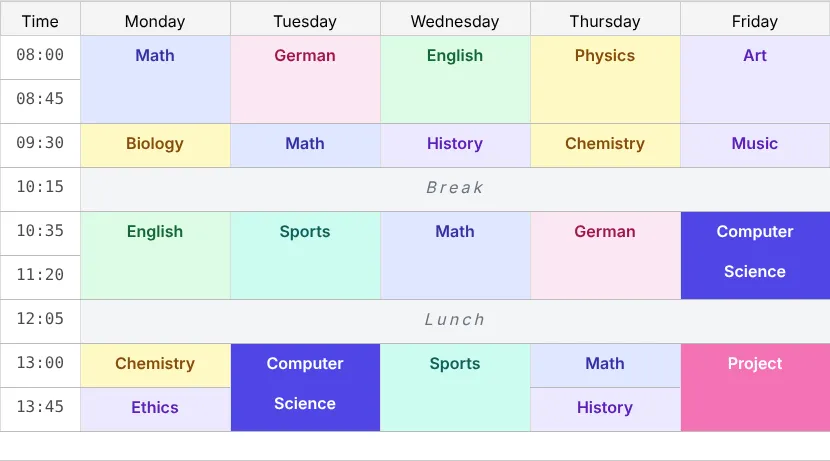
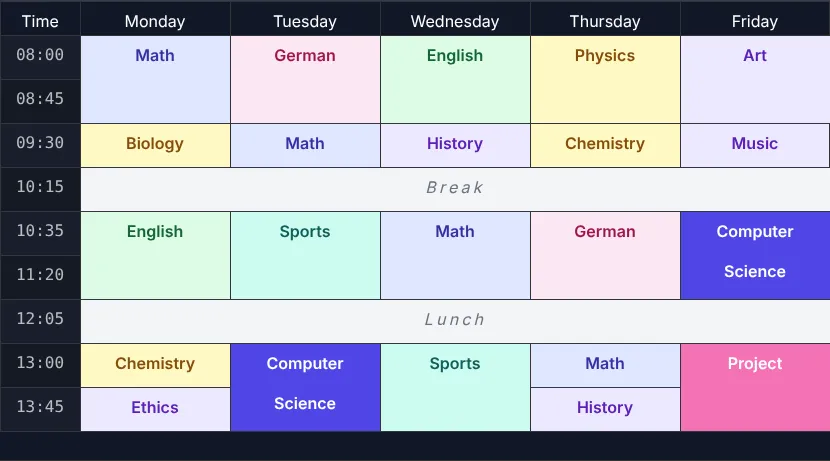
Rules
- Only the first cell of a block returns the span; the covered cells return 1. The rowspan code above checks “is the cell above the same?” for that.
- The table draws spanned cells at the end, separately – nothing is cut in half, even when the block starts above the visible area.
- Header and footer can span the same way, e.g. group labels over several columns (chapter 15 (Header groups)).
- Colours per subject come from
AreaModelIf.getCustomClassesAt()(chapter 27 (Heatmap)):
.tt-time { font-family: ui-monospace, monospace; opacity: 0.7; }.tt-break { background: #f3f4f6; color: #6b7280; font-style: italic; letter-spacing: 0.2em; }.tt-subject { font-weight: 600; }.tt-math { background: #e0e7ff; color: #3730a3; }.tt-german { background: #fce7f3; color: #9d174d; }.tt-english { background: #dcfce7; color: #166534; }.tt-physics, .tt-chemistry, .tt-biology { background: #fef9c3; color: #854d0e; }.tt-computer-science { background: #4f46e5; color: #ffffff; }.tt-project { background: #f472b6; color: #ffffff; }.tt-sports { background: #ccfbf1; color: #115e59; }.tt-music, .tt-art, .tt-history, .tt-ethics { background: #ede9fe; color: #5b21b6; }Showcases
The showcase Timetable builds a weekly plan with spans.
Next
Hierarchical data: chapter 30 (Tree table).