Chapter 09 of 40
GuiExpert Table in Angular 14 to 22
One source, nine builds: the package major follows your Angular major.
After this chapter you can
- pick the right package version
- use the standalone TableComponent
- rebuild the table from a signal
- Angular 22+: get the TableApi as a signal with <guiexpert-table-signal>
Pick the right package version
The major version of @guiexpert/angular-table follows your Angular major. All nine packages are built from
one source.
| Your Angular | Install |
|---|---|
| 22 (latest) | npm i @guiexpert/table @guiexpert/angular-table@22 |
| 14 … 21 | the same major, e.g. Angular 17: npm i @guiexpert/table @guiexpert/angular-table@17 (dist tag a17) |
The table CSS ships with the component – you don't import main.css in Angular.
The component
// Episode 009 – the same orders model, rendered by the Angular wrapper (Angular 14–22, here 22).import { ChangeDetectorRef, Component, computed, inject, signal } from "@angular/core";import { RenderWrapperFactory, TableComponent } from "@guiexpert/angular-table";import { GeMouseEvent, TableApi, TableOptions } from "@guiexpert/table";import { createOrderTableModel } from "./model/order-table";import { StatusChip } from "./status-chip";
@Component({  selector: "app-root",  imports: [TableComponent],  template: `    <header class="app-header">      <b>Angular 22</b>      <button (click)="toggle()">{{ rows() === 100000 ? "1,000 rows" : "100,000 rows" }}</button>      <span id="info">{{ info() }}</span>    </header>    <guiexpert-table class="table-div"      [tableModel]="model()" [tableOptions]="options"      (tableReady)="onReady($event)" (mouseClicked)="onClick($event)" />  `})export class App {  private readonly rwf = inject(RenderWrapperFactory);  private readonly cdr = inject(ChangeDetectorRef);  // episode 026: an Angular component per visible status cell  private readonly statusRenderer = this.rwf.create(StatusChip, this.cdr);
  readonly rows = signal(100_000);  // a new model object → the table is rebuilt  readonly model = computed(() => createOrderTableModel(this.rows(), { status: this.statusRenderer }));  readonly options = { ...new TableOptions() };  readonly info = signal("");
toggle(): void { this.rows.update(n => (n === 100_000 ? 1_000 : 100_000)); } onReady(api: TableApi): void { this.info.set(`${api.getBodyModel().getRowCount().toLocaleString("en")} orders`); } onClick(evt: GeMouseEvent): void { this.info.set(`row ${evt.rowIndex}, column ${evt.columnIndex}`); }}html, body { margin: 0; font: 14px/1.4 system-ui, sans-serif; }.app-header { height: 40px; box-sizing: border-box; padding: 8px 12px; background: #111827; color: #f9fafb; display: flex; gap: 24px; }#info { color: #f472b6; font-family: ui-monospace, monospace; }/* the custom element needs display: block and a fixed height (the table CSS ships with the component) */guiexpert-table.table-div { display: block; height: calc(100vh - 40px); }/* Episode 025 – status badge */.status-badge { display: inline-block; margin-top: 6px; padding: 0 10px; line-height: 20px; border-radius: 10px; font-size: 12px; font-weight: 600; }.status-open { background: #e0e7ff; color: #3730a3; }.status-paid { background: #dcfce7; color: #166534; }.status-shipped { background: #fce7f3; color: #9d174d; }.status-cancelled { background: #f3f4f6; color: #6b7280; text-decoration: line-through; }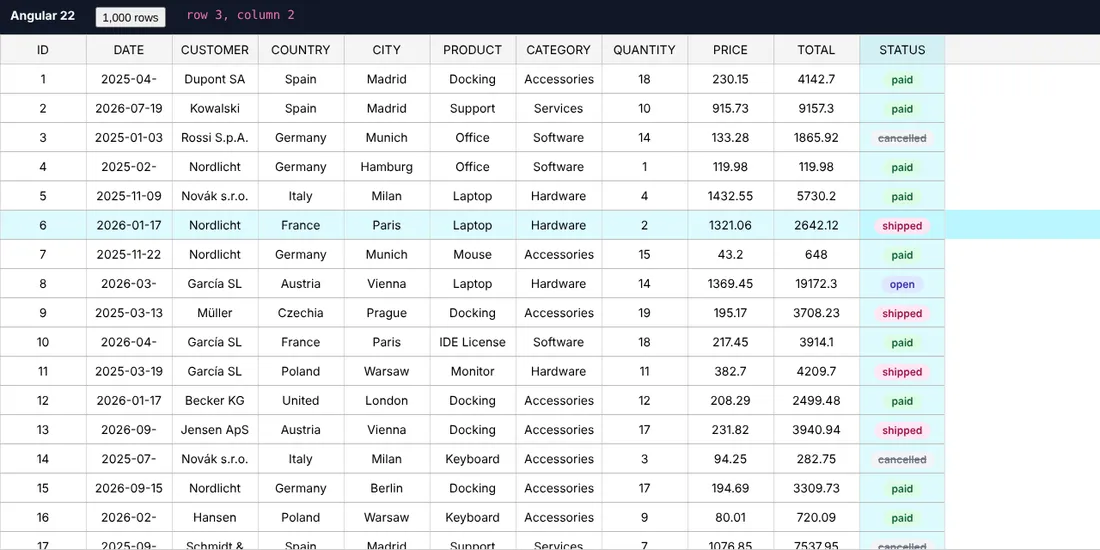
Rules for Angular
TableComponentis standalone – put it intoimports. Selector:<guiexpert-table>.- It uses
OnPushand initialises outside the Angular zone: scrolling 100,000 rows does not trigger change detection. - A new
[tableModel]object rebuilds the table (ngOnChanges) – here viacomputed();ngOnDestroycleans up. - Outputs:
(tableReady),(mouseClicked),(selectionChanged),(contextMenu),(mouseDraggingEnded)…$eventis theTableApiresp.GeMouseEvent. - The element needs
display: blockand a height.
Angular 22+: the table as a signal
From Angular 22 on, the package contains a second component: <guiexpert-table-signal>
(TableSignalComponent). Its inputs are signal inputs, its outputs signal outputs – and the
TableApi itself is a signal. Bind it two-way, and computed() and effect()
work on the API like on any other signal:
import { Component, computed, effect, signal } from "@angular/core";import { TableSignalComponent } from "@guiexpert/angular-table";import { TableApi, TableFactory } from "@guiexpert/table";
@Component({ selector: "app-orders", imports: [TableSignalComponent], template: ` <guiexpert-table-signal class="table-div" [tableModel]="model" [(tableApi)]="api" /> <button [disabled]="!ready()" (click)="api()?.downloadExcel('orders.xlsx', 'me')">Excel</button>`})export class OrdersComponent { readonly model = TableFactory.createTableModel({ rows: createOrders(100_000), properties: ["id", "customer", "city", "total"] }); readonly api = signal<TableApi | undefined>(undefined); readonly ready = computed(() => !!this.api()); constructor() { effect(() => this.api()?.scrollToIndex(0, 0)); }}[(tableApi)]="api"sets your signal as soon as the table exists – the button enables itself, theeffectruns once. There is no(tableReady): the event form is(tableApiChange).- A new
[tableModel]rebuilds the table and switchesapi()directly to the new API – noundefinedin between. When the component is removed,api()becomesundefined. - The right-click output is called
(contextMenu)– on<guiexpert-table>too, since 1.1.101. Avoid the old(contextmenu)(deprecated): Angular also binds it to the browser event, so the handler runs twice, first with a plainMouseEvent. - Works without Zone.js (
provideZonelessChangeDetection()). Mouse, keyboard and scroll events come outside the Angular zone: write a signal in the handler and the view updates – with or without Zone.js.
Angular components inside cells
RenderWrapperFactory.create(MyComponent, cdr) turns a component that implements ComponentRendererIf
into a cell renderer – see chapter 26 (Components as cells).
Next
Svelte, Solid, Preact and a side-by-side comparison of all wrappers: chapter 10 (Svelte, Solid, Preact).