Chapter 14 of 40
Array of arrays: header, body and footer as data
No objects needed – CSV rows go straight into the table.
After this chapter you can
- feed headerData, bodyData and footerData
- set widths with columnSizes
- load a CSV file
Every area as a two-dimensional array
Not every data source delivers objects. CSV files, spreadsheet exports, matrices from an API – they are rows of values.
TableFactory.createTableModel() takes them directly:
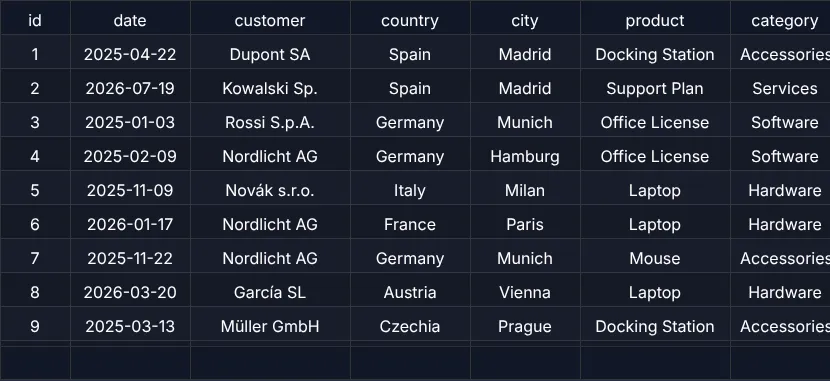
id,date,customer,country,city,product,category,quantity,price,total,status1,2025-04-22,Dupont SA,Spain,Madrid,Docking Station,Accessories,18,230.15,4142.7,paid2,2026-07-19,Kowalski Sp.,Spain,Madrid,Support Plan,Services,10,915.73,9157.3,paid…import { EventAdapter, SimpleDomService, TableFactory, TableOptions, TableScope } from "@guiexpert/table";
async function loadCsv(url: string): Promise<string[][]> { const text = await (await fetch(url)).text(); return text.trim().split("\n").map(line => line.split(",")); // simple CSV: no quoted commas}
function totalsRow(rows: string[][]): string[] { const total = rows.reduce((sum, row) => sum + Number(row[9]), 0); // column 9 = total return ["", "", "", "", "", "", "", "", "Σ", total.toFixed(2), `${rows.length} rows`];}async function main(host: HTMLDivElement): Promise<void> { const [header, ...rows] = await loadCsv("/data/orders.csv"); const tableModel = TableFactory.createTableModel({ headerData: [header], bodyData: rows, footerData: [totalsRow(rows)], columnSizes: [70, 120, 160, 120, 110, 150, 110, 70, 90, 100, 100] }); new TableScope(host, tableModel, new SimpleDomService(), { ...new TableOptions() }, new EventAdapter()) .firstInit();}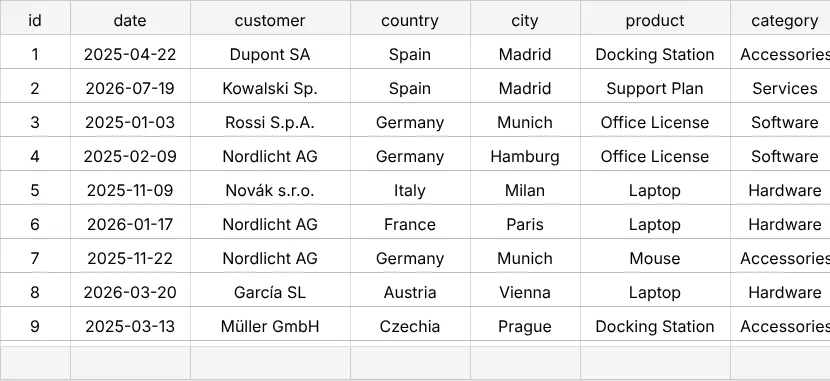
The fields
headerDataandfooterDataare arrays of rows – several header rows are possible:headerData: [["Order", "", "Amount", ""], ["ID", "Date", "Qty", "Total"]].bodyData– the body rows; the factory wraps them into anAreaModelArrayOfArrays.columnSizes– widths in pixels, when you don't need full ColumnDefs.
Next
Grouped, multi-row headers that the user can collapse: chapter 15 (Header groups).