Chapter 22 of 40
Select cells, rows and ranges – and copy them
One selection model per table: cells, rows, columns or ranges, with mouse and keyboard.
After this chapter you can
- choose a selection type
- react to selection changes
- copy the selection to the clipboard
- copy, cut and paste with Excel and Google Sheets (since 1.1.99)
A selection model per table
What can be selected is decided by a SelectionModel. It takes a type
(ExtendedSelectionType) and a mode (SelectionMode):
import { type ExtendedSelectionType, SelectionModel, TableOptions, type TableOptionsIf } from "@guiexpert/table";
function createOptions(type: ExtendedSelectionType): TableOptionsIf { const selectionModel = new SelectionModel(type, "multi"); // "cell" | "row" | "column" | "range" return { ...new TableOptions(), getSelectionModel: () => selectionModel };}| Type | A click selects … |
|---|---|
"cell" | one cell |
"row" / "column" | the whole row / column |
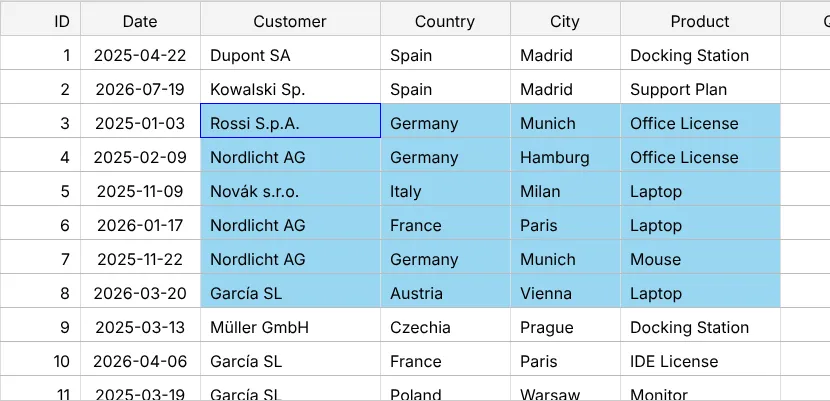
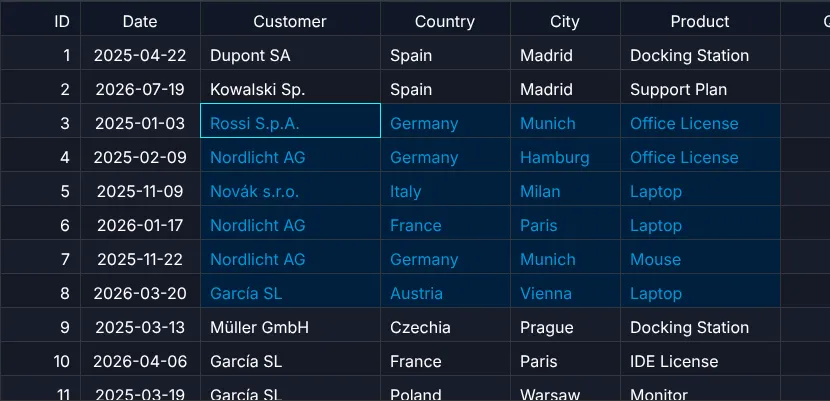
"range" | one cell – or a rectangle: drag with the mouse or Shift+click |
"none" | nothing |
Mode "multi" adds more selections with ⌘/Ctrl+click; "single" replaces the selection.
⌘/Ctrl+click on a selected cell deselects it, ⌘/Ctrl+Alt+click removes a cell from the selection.
Mouse and keyboard
- Drag = range (since 1.1.88), ⌘/Ctrl+drag = another range, Shift+click = range from the last click up to here (click again with Shift to change it), ⌘/Ctrl+click = another cell.
- ⌘/Ctrl+C copies, ⌘/Ctrl+A selects all (⌘/Ctrl+A,
⌘/Ctrl+C copies the whole displayed body, up to
CopyService.maxCopyCellscells), arrow keys move the focus. - Shortcuts can be remapped or switched off (
shortcutActionIdMapping,shortcutActionsDisabledinTableOptionsIf).
React to the selection
import { EventAdapter, type SelectionModelIf } from "@guiexpert/table";
class SelectionEvents extends EventAdapter {  constructor(private readonly show: (text: string) => void, private readonly getRowCount: () => number) {    super();  }  override onSelectionChanged(model: SelectionModelIf): void {    if (!model.hasSelection()) return this.show("nothing selected");    // rows with at least one selected cell – "row"/"column" ranges are unbounded (r2/c2 = MAX_SAFE_INTEGER)    const rows = model.getMergedRowIndices(this.getRowCount());    const ranges = model.getRanges().filter(r => !r.gammaRange).length;   // skip special ranges    this.show(`${rows.length} row(s), ${ranges} range(s) · ⌘/Ctrl+C copies`);  }}
EventListenerIf.onSelectionChanged() gets the model (once per click); SelectionModelIf.getRanges()
returns the selected rectangles (r1, c1, r2, c2 – for rows and columns unbounded, so count rows with
SelectionModelIf.getMergedRowIndices()). Event listeners in general: chapter 23 (Events & context menu).
Copy
copyButton.addEventListener("click", async () => { const text = await tableApi.copyToClipboard(); // tabs + newlines → Excel info.textContent = `copied ${text.split("\n").length} lines`;});
TableApi.copyToClipboard() resolves with the copied text – tab-separated, one line per row. Pasted into
Excel, Numbers or Google Sheets it lands in cells.
Cut and paste – with Excel
With clipboard: true the table answers the browser's own copy, cut
and paste events: Ctrl/⌘+C, X and V – also from the browser menu.
Excel and Google Sheets understand what it copies (text and an HTML table), and a block copied there lands in the
table cell by cell: numbers become numbers, quotes and line breaks inside cells survive, a single value fills the whole
selection. Only editable cells are written; text from outside runs through editInputPipe,
validate always runs.
const selectionModel = new SelectionModel("range", "multi");const tableOptions: TableOptionsIf = { ...new TableOptions(), getSelectionModel: () => selectionModel, editing: true, clipboard: { pasteAddsRows: true, createRow: () => ({ id: nextId(), quantity: 0 }) }, undo: true // a paste is one undo step};tableApi.pasteText("1 23 4"); // the same from code
Cut marks the cells with a dashed frame; they are cleared when you paste – one step, one undo. TableApi.cutSelection()
and TableApi.pasteText() do the same from your own buttons or menu.
Next
Clicks, double-clicks and a context menu of your own: chapter 23 (Events & context menu).