Chapter 40 of 40
A spreadsheet in the browser: cell formulas, copy & paste, undo
Column letters, row numbers, =SUM(B2:B9), paste from Excel and Ctrl+Z – one call, MIT-licensed, formulas never run as code.
After this chapter you can
- build a sheet with SpreadsheetFactory
- write formulas with A1 references and 70 Excel functions
- add a formula bar
- insert and delete rows and columns – references follow
- switch the parts on in an existing table: editing, clipboard, undo, cellFormulas
- save the sheet as JSON and export it to Excel with formulas
Excel, but in your app
A budget, a quote, a price calculation: your users know how this works in Excel. They type over a cell, paste a block
they copied from a workbook, write =SUM(B2:B9) and press Ctrl+Z when they got it
wrong. Since @guiexpert/table@1.1.99 the table can do all of that – MIT-licensed, without a dependency, in
every framework. One call builds the sheet:
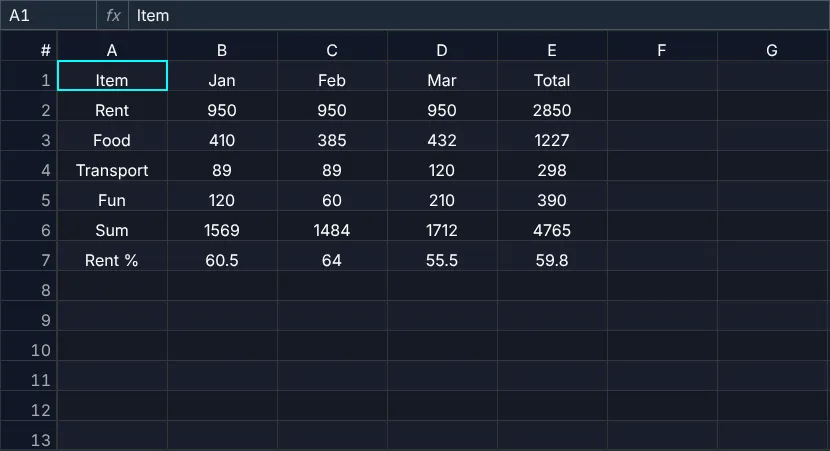
const data: unknown[][] = [ ["Item", "Jan", "Feb", "Mar", "Total"], ["Rent", 950, 950, 950, "=SUM(B2:D2)"], ["Food", 410, 385, 432, "=SUM(B3:D3)"], ["Transport", 89, 89, 120, "=SUM(B4:D4)"], ["Fun", 120, 60, 210, "=SUM(B5:D5)"], ["Sum", "=SUM(B2:B5)", "=SUM(C2:C5)", "=SUM(D2:D5)", "=SUM(E2:E5)"], ["Rent %", "=ROUND(B2/B6*100,1)", "=ROUND(C2/C6*100,1)", "=ROUND(D2/D6*100,1)", "=ROUND(E2/E6*100,1)"]];const { tableModel, tableOptions } = SpreadsheetFactory.create({ data, // inputs: numbers, texts and formulas ("=…") rowCount: 1_000, // 1,000 rows × A–Z – only the filled cells cost memory columnWidth: 110});const listener = new EventAdapter();listener.onUndoStackChanged = (evt: GeUndoEvent) => { undo.disabled = !evt.canUndo; };const scope = new TableScope(ctx.host, tableModel, new SimpleDomService(), tableOptions, listener);scope.firstInit();const api: TableApi = scope.getApi();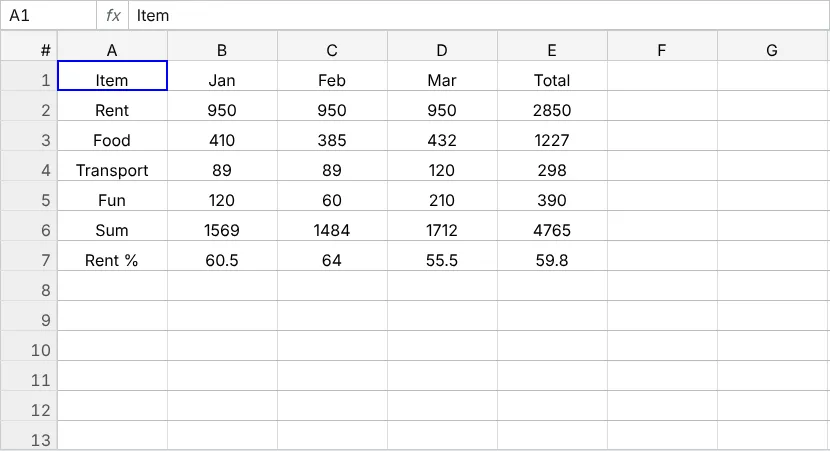
What one call switches on
SpreadsheetFactory.create() returns a model and the options for a table or a wrapper – exactly like
TableFactory. The model has column letters, row numbers and a sparse body: a million
empty rows cost nothing, only filled cells take memory. The options contain the preset
spreadsheet: true, which stands for five parts you can also use
one by one:
editing– type to overwrite, F2 to edit, Enter/Tab move, Delete clears, Ctrl+Enter fills the selection, Ctrl+arrow jumps to the edge of the data (chapter 31 (Inline editing));clipboard– copy, cut and paste with Excel and Google Sheets (chapter 22 (Selection & copy));undo– Ctrl+Z / Ctrl+Y for edits, paste, fill and structure changes;cellFormulas– formulas with A1 references;fillHandle– drag the square at the corner of the selection.
// an existing table: the same preset – or the parts you wantconst tableOptions: TableOptionsIf = { ...new TableOptions(), spreadsheet: true };const onlySome: TableOptionsIf = { ...new TableOptions(), spreadsheet: { cellFormulas: false, fillHandle: false } };
In an existing table with object rows the formulas address the data columns by letters A, B, C …; to
show them above your labels, build the model with TableFactory.createTableModel({ …, columnLetters: true }). Columns that must not take formulas (an id, a free text) get
cellFormulas: false in their ColumnDef.
Formulas with A1 references
A formula is a text that starts with = – in your data, typed by a user or pasted. References are
B2, $B$2 (absolute) and ranges B2:D5; 70 Excel functions are built in
(FORMULA_FUNCTION_INFO): SUM, AVERAGE, IF, ROUND,
VLOOKUP, XLOOKUP, SUMIFS, TEXT, DATE and more. The
sheet keeps a dependency graph: a changed cell recalculates only what depends on it. Errors look like in Excel:
#DIV/0!, #REF!, #NAME?, a circular reference is #CIRC!.
tableApi.setCellInput(1, 5, "=B2*2"); // row 2, column E (column 0 = row numbers)tableApi.getCellInput(1, 5); // "=B2*2"tableApi.getCellValue(1, 5); // 1900tableApi.getCellAddress(1, 5); // "E2"tableApi.evaluateFormula("=SUM(B2:D2)"); // 2850 – without writing a cell
While a user types a formula the references are colored and framed in the table, arrow keys or a click
point at cells (F4 toggles $) and a list suggests functions with a short
description – also for screen readers.
A formula bar
The cell shows the result, the FormulaBar the formula of the active cell – and its address. Typing
there writes the cell (one undo step), Escape restores it, an address like D10 or
B2:C5 in the address box goes there. It is plain DOM, so it works with every wrapper: pass the
TableApi of tableReady.
const barHost = document.createElement("div"); // above the tablectx.host.before(barHost);const bar = new FormulaBar(barHost, api); // address box + the formula of the active cellInsert and delete rows and columns
TableApi.insertRows(), TableApi.deleteRows(),
TableApi.insertColumns() and TableApi.deleteColumns() take the row number −
1 and the letter index – the position in the sheet, also while it is sorted. Every formula follows:
=SUM(B2:B5) becomes =SUM(B2:B6) after a row inside, a deleted reference becomes
#REF!. Each change is one undo step.
const rowOfActiveCell = () => { const [row, col] = api.getActiveCell() ?? [0, 1]; const address = api.getCellAddress(row, Math.max(col, 1)) ?? "A1"; // "B3" – also when sorted return Number(address.replace(/^[A-Z]+/, "")) - 1;};ctx.button("insert row", () => api.insertRows(rowOfActiveCell(), 1)); // =SUM(B2:B5) → =SUM(B2:B6)ctx.button("delete row", () => api.deleteRows(rowOfActiveCell(), 1));const undo = ctx.button("undo", () => api.undo());undo.disabled = true;ctx.button("Excel", () => api.downloadExcel("budget.xlsx", "", { cellFormulas: true })); // real formulas
The table has no context menu of its own – a right-click arrives as onContextmenu
(chapter 23 (Events & context menu)); the showcase builds a small
menu with cut, copy, insert and delete in about 40 lines of HTML and JavaScript.
Save and export
TableApi.getSheetData() returns rows × columns of inputs – the formulas, not their
results – ready for JSON.stringify and your server; pass them back as data to load the sheet.
The Excel export with { cellFormulas: true } writes real formulas, Excel calculates them when it opens
the file.
localStorage.setItem("budget", JSON.stringify(tableApi.getSheetData()));const saved = JSON.parse(localStorage.getItem("budget") ?? "[]") as unknown[][];const { tableModel, tableOptions } = SpreadsheetFactory.create({ data: saved });await tableApi.downloadExcel("budget.xlsx", "", { cellFormulas: true });What is different from Excel
- Function names are English, the separator is
,(;is accepted), decimals use.in formulas; typed and pasted values follow the locale ("1,5"is 1.5 in German). - No cell formatting toolbar, no charts, no several sheets per table, no array formulas that spill.
- Dates are Excel serial numbers inside formulas (
=DATE(2026,10,17)+1works), shown as dates.
Next
Back to the overview of everything new: What's new – or the checklist of the course: chapter 34 (Checklist & finale).
API used in this chapter
SpreadsheetFactory.create()SpreadsheetParamIfTableOptionsIf.spreadsheetTableOptionsIf.cellFormulasFormulaBarTableApi.getActiveCell()TableApi.getCellAddress()TableApi.setCellInput()TableApi.getCellInput()TableApi.getCellValue()TableApi.insertRows()TableApi.deleteRows()TableApi.insertColumns()TableApi.deleteColumns()TableApi.getSheetData()TableApi.undo()TableApi.goToAddress()FORMULA_FUNCTION_INFOSheetEngine