Releases 1.1.91 – 1.1.100 · October 2026
Fourteen new features.
One month. Still MIT.
From screen readers to pivot tables: everything you see on this page is part of the free packages – in Angular, React, Vue, Svelte, Solid, Preact, Web Components and plain JavaScript. 6 of the fourteen are Enterprise features at ag-Grid.
npm i @guiexpert/table@1.1.105
Screen readers and keyboard
A virtual grid only has the visible rows in the DOM – a screen reader would hear 30 rows of a million, and a table without keyboard support fails WCAG 2.1 AA and the BFSG.
- WAI-ARIA grid / treegrid: row and column count of all rows, row headers, sort state
- keyboard: arrows, Home/End, Page ↑/↓, Ctrl+Home, Enter, F2, header focus – the table is one tab stop
- announcements for sorting, filtering, selection and copying – texts in your language
- tested with axe-core in CI – automated checks of the WAI-ARIA grid pattern
API:
ariaLabelledBy · ariaTexts · AriaTextsIf · announce()
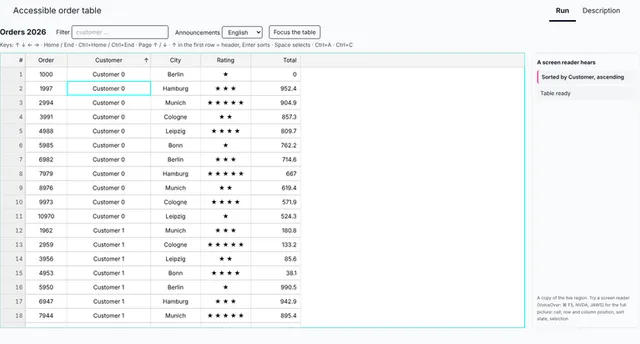
const tableOptions: TableOptionsIf = { ...new TableOptions(), ariaLabelledBy: "orders-title", // the visible heading names the grid ariaTexts: { // what the screen reader says – in your language sorted: (column, state) => state ? `Sortiert nach ${column}` : "Unsortiert", filtered: rowCount => `${rowCount} Zeilen` }};tableApi.announce("12 new orders arrived"); // your own announcementLoading and “no rows” overlays
While data is loading, an empty table looks broken; after a filter without hits it looks like an error.
- “Loading…” with a pure CSS spinner – no image, no library
- “No rows to show” and “No matching rows” appear by themselves
- blocks clicks while loading (optional), screen readers hear it (aria-busy)
- a loading prop in every framework wrapper
API:
showLoadingOverlay() · hideOverlay() · getOverlayState() · overlayOptions
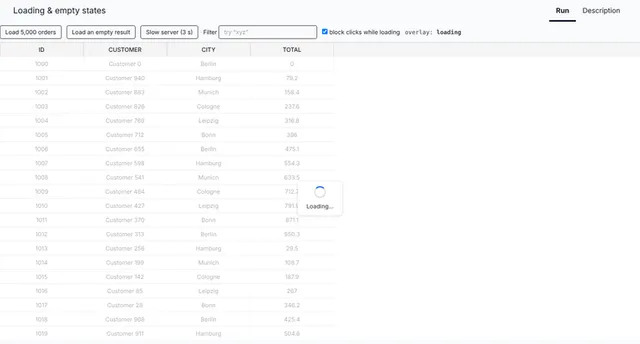
tableApi.showLoadingOverlay(); // CSS spinner + "Loading…"const orders: Order[] = await fetch("/api/orders").then(r => r.json());tableApi.setRows(orders);tableApi.repaintHard();tableApi.hideOverlay(); // 0 rows → "No rows to show" by itself, // a filter without hits → "No matching rows"// React, Vue, Svelte, Angular …: <GuiexpertTable loading={isLoading} … />Remember the state – or save it on your server
Users resize, move and hide columns, sort, scroll and select – and after a reload everything is gone.
- column order, widths and visibility, sorting, scroll position, open tree nodes, checked and selected rows
- rows by id, columns by property – never by index, so it survives new data
- localStorage with one option, or JSON for your server: getState(), applyState(), onStateChanged
API:
AutoRestoreOptions · getState() · applyState() · resetState() · onStateChanged()
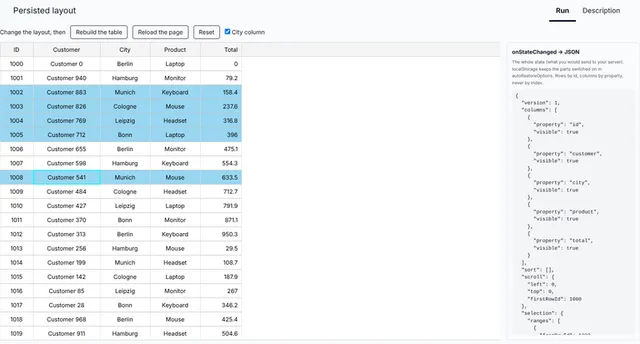
const tableOptions: TableOptionsIf = { ...new TableOptions(), autoRestoreOptions: { ...new AutoRestoreOptions<Order>(), getStorageKeyFn: () => "orders", // localStorage["orderstableState"] getRowId: (order: Order) => order.id, autoRestoreColumnLayout: true, // order, widths, hidden columns autoRestoreSortingState: true, autoRestoreSelectedState: true }};const json = tableApi.getState(); // or: send it to your servertableApi.applyState(json);Row numbers like in a spreadsheet
“Look at row 1,284” only works if there are row numbers – and they must fit 2,000,000.
- a fixed “#” column in front, the width follows the largest number
- numbers of the current view or of the original order
- click a number to select the row, click “#” to select all
API:
rowNumbersVisible · RowNumberOptionsIf · RowNumberColumnDef
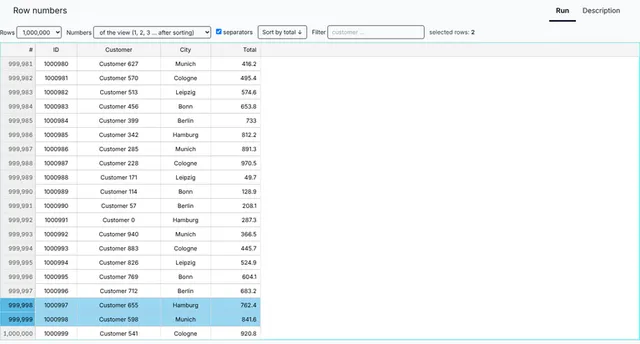
const tableModel = TableFactory.createTableModel({ rows: orders, rowNumbersVisible: true // or { mode: "original", format: n => n.toLocaleString() }});Total rows and a status bar for the selection
Every business table needs a sum at the bottom – and it has to be right after filtering.
- sum, count, avg, min, max, countDistinct, first, last – or your own aggregator
- the footer follows filter, sorting and edits
- count, sum and average of the selected cells for a status bar
API:
footerAggregates · Aggregators · getSelectionAggregates() · AreaModelAggregateFooter
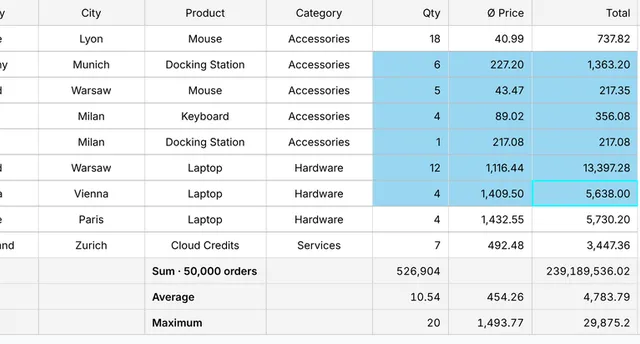
const tableModel = TableFactory.createTableModel({ rows: orders, footerAggregates: { quantity: "sum", total: "sum" } // follows filter and sorting});const { count, sum, avg } = tableApi.getSelectionAggregates(); // the selected cellsRow grouping with subtotals
50,000 orders are a list – revenue per country and city is an answer.
- any number of levels, by field or by a computed key
- subtotals per group and a total row – averages computed correctly over all levels
- filter, sort by aggregate, regroup at runtime
API:
createTableModel() · setRowGroupBy() · AreaModelRowGroups
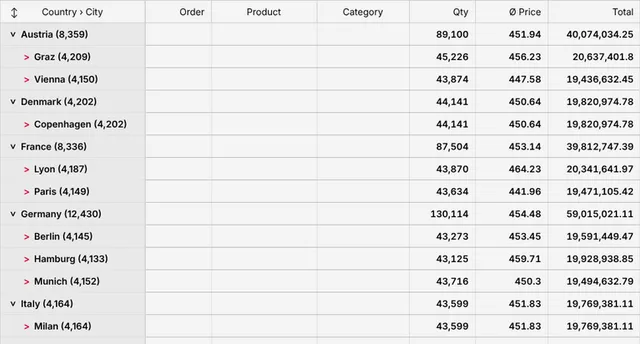
const tableModel = RowGroupFactory.createTableModel({ rows: orders, groupBy: ["country", "city"], aggregations: { quantity: "sum", total: "sum" }});tableApi.setRowGroupBy(["category"]); // regroup at runtimePivot tables
Countries in the rows, years and quarters in the columns, revenue in the cells – with subtotals and totals.
- row fields, column fields and several values per cell
- multi-row header made from the data, collapsible column groups
- total column and total row from the source rows, pivot again at runtime
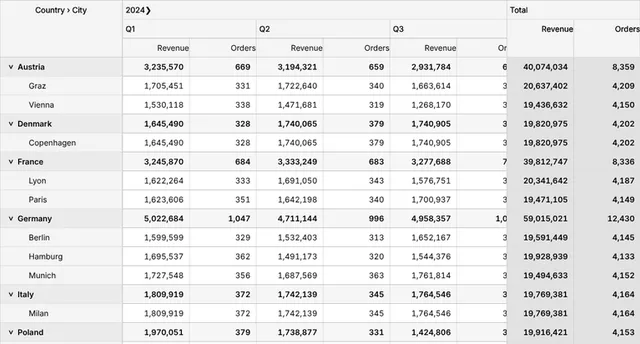
const tableModel = PivotFactory.createTableModel({ rows: orders, rowFields: ["country", "city"], columnFields: ["year"], values: ["total"] // sum of the revenue per cell});tableApi.setPivotConfig({ columnFields: ["category"] }); // pivot againCalculated columns, “Show values as”, formulas
Net, VAT, gross, share of the total, rank – computed without changing your data, and still sortable, filterable and exportable.
- valueGetter: one place – sorting, copy, Excel and totals use the computed value
- show values as: % of column, parent or grand total (row total in pivots), running total, difference, rank
- formulas typed by users: “ROUND([price] * [quantity] * 1.19, 2)” – own parser, no eval (CSP-safe)
- error values like #DIV/0! instead of exceptions
API:
valueGetter · showValuesAs · formula · setColumnFormula() · compileFormula
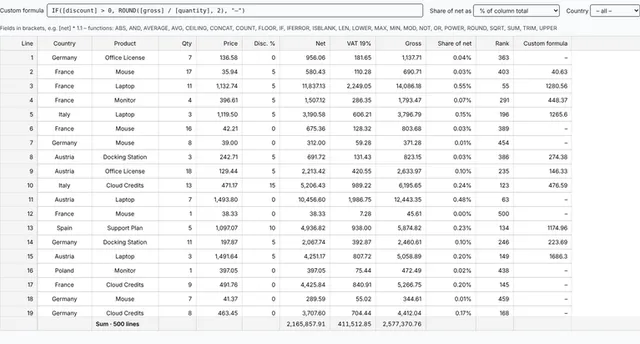
const columnDefs = [ ColumnDef.create({ property: "product", headerLabel: "Product" }), ColumnDef.create({ property: "net", headerLabel: "Net", valueGetter: (o: Item) => o.price * o.quantity }), ColumnDef.create({ property: "gross", headerLabel: "Gross", formula: "ROUND([net] * 1.19, 2)" }), ColumnDef.create({ property: "share", headerLabel: "Share", valueGetter: (o: Item) => o.price * o.quantity, showValuesAs: "percentOfColumnTotal" })];tableApi.setColumnFormula("gross", "ROUND([net] * 1.07, 2)"); // from an input fieldDrag rows into order
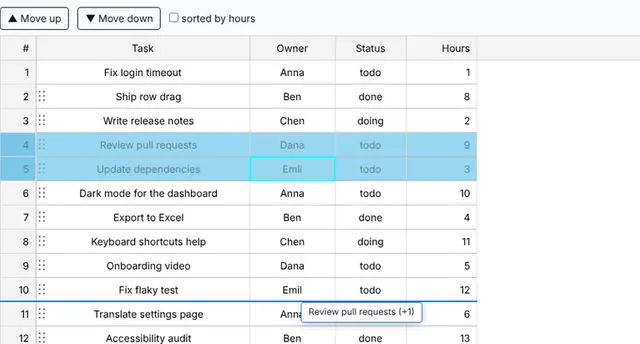
Priorities, playlists, agendas – users want to put rows in order by hand, also on touch screens and with the keyboard.
- a grip per row: mouse, touch and pen (Pointer Events), ghost, drop marker, auto-scroll
- several selected rows at once, trees (before, after, inside)
- keyboard: Ctrl+Alt+↑/↓ with an announcement
- the table moves the rows – or you get only the events
API:
rowDrag · rowDrag · GeRowDragEvent · moveRows()
const tableModel = TableFactory.createTableModel({ rows: tasks, rowDrag: true });listener.onRowDragEnd = (evt: GeRowDragEvent<Task>) => { if (evt.moved) save(tasks); // tasks is already in the new order};Fill handle and batch edit
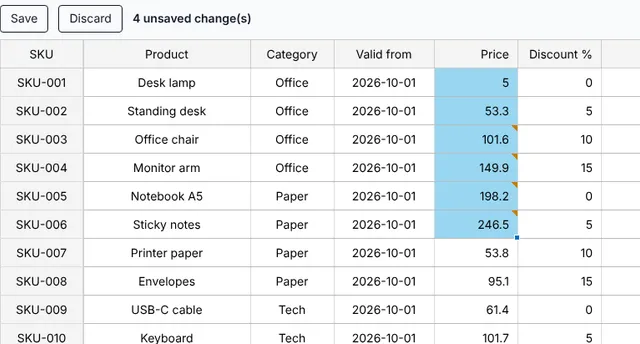
Spreadsheet users drag a corner to continue 1, 2, 3 … – and want to review their changes before saving them.
- drag the fill handle: copy values or continue series (numbers, dates, “Item 9” → “Item 10”), Ctrl/⌘+D, Ctrl/⌘+R
- batch edit: changes are marked, then committed or discarded together
- validation per column, one change event with old and new values for your server
API:
fillHandle · batchEdit · getPendingChanges() · commitBatchEdit() · validate
const tableOptions: TableOptionsIf = { ...new TableOptions(), getSelectionModel: () => new SelectionModel("range", "multi"), fillHandle: true, // drag the corner of the selection batchEdit: true // collect changes, mark them};saveButton.onclick = async () => { await sendToServer(tableApi.getPendingChanges()); tableApi.commitBatchEdit(); // or cancelBatchEdit()};Master/detail
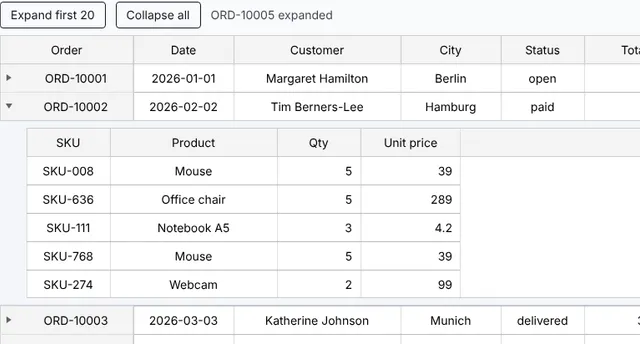
An order has items, a customer has contacts – open a row and show them right below it, without leaving the table.
- any content over the full width: a second table, a form, a framework component
- works with virtual scrolling and 100,000 rows; the detail keeps its state while you scroll
- fixed or measured height, Enter / Tab on the keyboard, treegrid for screen readers
API:
masterDetail · MasterDetailOptionsIf · createTable() · setDetailExpanded()
const tableOptions: TableOptionsIf = { ...new TableOptions(), masterDetail: { detailHeight: 180, detailRenderer: (container, order: Order, ctx) => { ctx.createTable({ tableModel: TableFactory.createTableModel({ rows: order.items }) }); } }};tableApi.setDetailExpanded(0, true);Right-to-left: Arabic, Hebrew, Persian
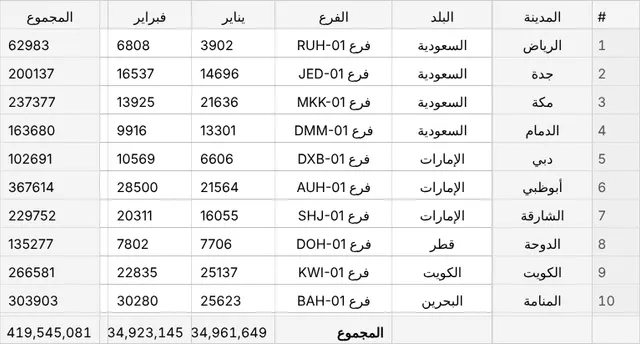
In Arabic and Hebrew the first column is on the right – and so are scrolling, fixed columns and the arrow keys.
- one option mirrors everything: columns, scrolling, fixed columns, tree, resize, fill handle, row drag, details
- arrow keys in reading direction, a right-to-left Excel sheet
- "auto" follows <html dir="rtl">; left-to-right stays unchanged
API:
direction · getDirection()
const tableOptions: TableOptionsIf = { ...new TableOptions(), direction: "rtl" // or "auto": from <html dir="rtl">};Spreadsheet: formulas, copy & paste with Excel, undo
Users want Excel in the browser: type over a cell, paste a block from Excel, write =SUM(B2:B9), press Ctrl+Z.
- Excel-style editing: type to overwrite, F2, Enter/Tab, Delete, Ctrl+Enter, Ctrl+arrow to the data edge
- copy, cut and paste with Excel and Google Sheets; undo and redo of every change
- cell formulas with A1 references, 70 Excel functions, colored references while typing – never run as code
- one call builds a sheet: letters, row numbers, formula bar, insert/delete rows and columns, Excel export with formulas
API:
create() · spreadsheet · cellFormulas · FormulaBar · undo() · insertRows()
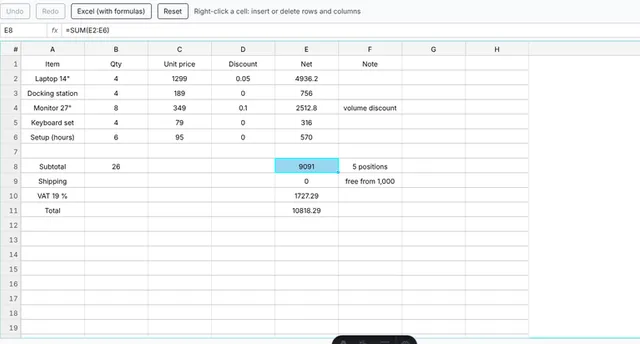
const { tableModel, tableOptions } = SpreadsheetFactory.create({ data: [ ["Item", "Qty", "Price", "Net"], ["Laptop", 4, 1299, "=B2*C2"], ["Monitor", 8, 349, "=B3*C3"], ["Total", "", "", "=SUM(D2:D3)"] ]});// existing tables: spreadsheet: true in the optionsAngular Signals: the table as a signal
Angular 22 apps run on signals and without Zone.js – but the table API arrived through (tableReady), a field and ?. chains everywhere.
- <guiexpert-table-signal>: signal inputs, signal outputs, the TableApi as a signal – [(tableApi)]="api"
- computed() and effect() on the API: buttons enable themselves, code runs once the table exists
- zoneless-ready, no RxJS; a new model switches the API directly – no undefined in between
- for Angular 22 and every later major – the classic <guiexpert-table> stays for Angular 14 – 22
API:
TableApi
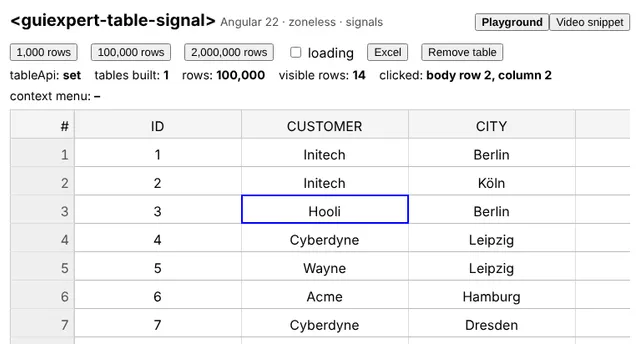
@Component({ selector: "app-orders", imports: [TableSignalComponent], template: ` <guiexpert-table-signal class="table-div" [tableModel]="model" [(tableApi)]="api" /> <button [disabled]="!ready()" (click)="api()?.downloadExcel('orders.xlsx', 'me')">Excel</button>`})export class OrdersComponent { readonly model = TableFactory.createTableModel({ rows: createOrders(100_000), properties: ["id", "customer", "city", "total"] }); readonly api = signal<TableApi | undefined>(undefined); readonly ready = computed(() => !!this.api()); constructor() { effect(() => this.api()?.scrollToIndex(0, 0)); }}What is still missing
Honest list: a drag & drop group panel and pivot field list, a filter UI, a context menu, charts and a server-side row model are not built in. The comparison with ag-Grid Community and Enterprise is on the home page and in chapter 3 of the training.
Release notes with every detail: GitHub releases · developer guide: instructions.md · API reference.