Chapter 38 of 40
Master/detail: an order and its items
100,000 orders – open one and its items appear right below it as a second table, also while you scroll far away and back.
After this chapter you can
- show a detail row with any content below a row
- nest a second GuiExpert table without leaks
- choose a fixed or a measured height
- know why the detail survives scrolling and sorting
- use the keyboard, events and framework components
One row, more to say
An order has items, a customer has contacts, a ticket has a history. Showing all of it as columns makes the table
unreadable; a dialog hides the other rows. Master/detail opens a row: right below it, over the full width
of the table, a detail row shows whatever belongs to it – here a second GuiExpert table with the items.
Since @guiexpert/table@1.1.97 this is one option – MIT-licensed; in ag-Grid master/detail is an Enterprise
feature.
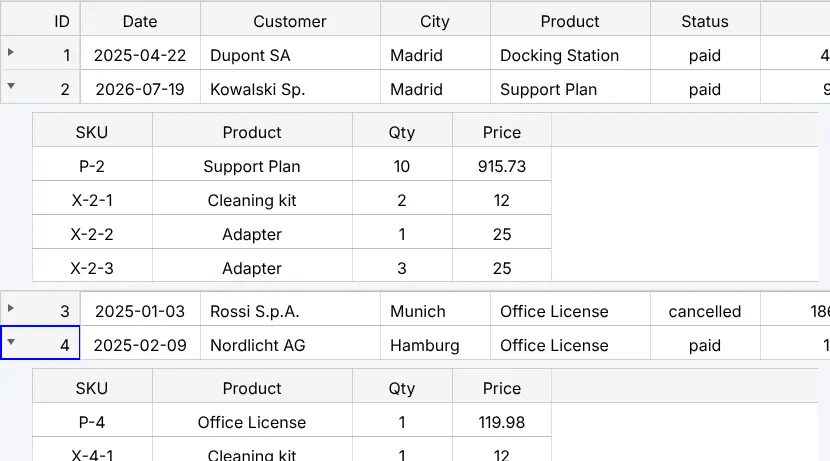
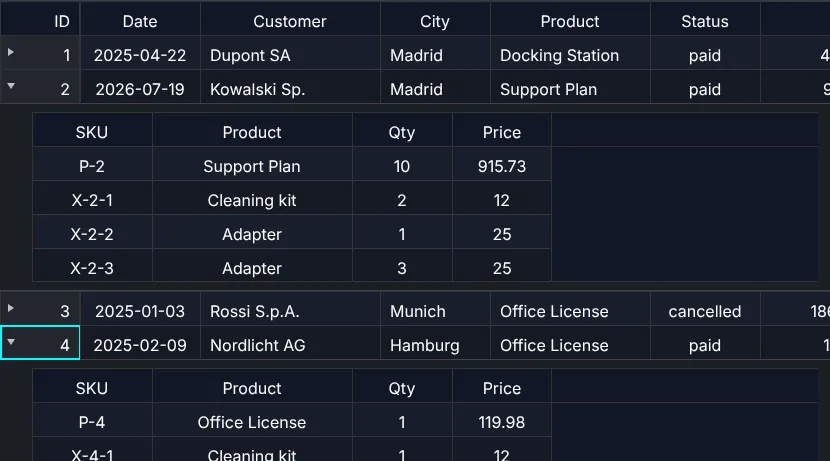
One option, one renderer
TableOptionsIf.masterDetail needs a detailRenderer: a function that gets an empty
container, the row and a context (DetailRenderContextIf). For a nested table,
DetailRenderContextIf.createTable() does the rest – including destroy() when the detail row
goes away:
/** The detail: the items of the order as a nested table (destroyed with the detail row). */const itemTable: DetailRenderFnType<Order> = (_container, order, ctx) => { ctx.createTable({ tableModel: TableFactory.createTableModel({ rows: itemsOf(order), columnDefs: [ ColumnDef.create({ property: "sku", headerLabel: "SKU", width: px120 }), ColumnDef.create({ property: "product", headerLabel: "Product", width: px200 }), ColumnDef.create({ property: "quantity", headerLabel: "Qty", width: px100 }), ColumnDef.create({ property: "price", headerLabel: "Price", width: px100 }) ] }) });};const tableOptions: TableOptionsIf = { ...new TableOptions(), getFocusModel: () => focusModel, getSelectionModel: () => selectionModel, masterDetail: { // px per order: header + one row per item, padding and borders – or measured ("auto") detailHeight: form ? "auto" : (order: Order) => (itemsOf(order).length + 1) * 34 + 18, detailRenderer: form ? noteForm : itemTable }};- The ▸ icon sits in the first data column – behind row numbers and the checkbox column, where a tree has its arrow.
toggleColumn: "city"moves it;isMaster: row => row.items.length > 0limits it to some rows. - The detail row spans the whole width, also the fixed column on the left, and does not move when you scroll horizontally.
- In code:
TableApi.setDetailExpanded()(display index or row object),TableApi.toggleDetail(),TableApi.getExpandedDetailRows(),TableApi.collapseAllDetails():
api.setDetailExpanded(1, true); // display index – or the row object: api.setDetailExpanded(orders[1], true)Why the detail survives scrolling
Virtual scrolling (chapter 2 (Virtual scrolling)) rebuilds the visible rows in every frame. A nested table living inside such a row would be destroyed and created again all the time – with its scroll position, its selection and every input. So the detail rows live on their own layer above the rows:
- the content is created when the detail row becomes visible for the first time – opening 100,000 rows costs nothing in advance;
- scrolled out of view, it is only hidden (
content-visibility: hidden) – back in view it is the same DOM, with the same scroll position; - it is destroyed when the row is closed, when the table is destroyed (the wrappers do it on a new
model or unmount) and when more than
maxRenderedDetails(50) contents exist – then the one out of view the longest goes first and comes back as new (context.recreated).
The heights of the detail rows sit between the row heights. Since 1.1.97 the table keeps the row positions as
prefix sums (RowLayout): the first visible row is found by a binary search, so
scrolling stays fast with open details – and for variable row heights in general (2 million rows: as fast as with
one fixed height). Sorting and filtering keep each detail with its row (the row object, or getRowId).
Fixed or measured height
detailHeight: 220– px; the container scrolls if the content is taller. Best for nested tables.detailHeight: "auto"(the default) – measured with aResizeObserver; if the content grows (a textarea is resized), the rows below move. Until the first measurementestimatedDetailHeight(200) is used.- A function per row – e.g. the number of items × the row height.
The form of the demo (switch “form instead of items”) has a measured height:
/** Another detail: a form – texts via textContent/value, never innerHTML. Its height is measured ("auto"). */const noteForm: DetailRenderFnType<Order> = (container, order, ctx) => { const label = document.createElement("label"); label.textContent = `Note for order ${order.id} (${order.customer})`; const note = document.createElement("textarea"); note.rows = 2; note.style.cssText = "display:block; width:min(480px, 100%); margin-top:4px"; note.addEventListener("change", () => ctx.tableApi.announce("Note saved"), { signal: ctx.signal }); label.append(note); container.append(label);};Events, keyboard, screen readers
const listener = new EventAdapter();listener.onDetailExpandedChanged = (evt: GeDetailEvent<Order>) => ctx.info(`order ${evt.row.id} ${evt.expanded ? "opened" : "closed"} (${evt.source})`);EventListenerIf.onDetailExpandedChanged()–GeDetailEventwith row, index,expandedandsource(mouse, keyboard, api, state); in the wrappersdetailExpandedChanged.- Clicks, keys and drags inside a detail belong to the detail: arrow keys in the item table do not move the focus of the orders. The mouse wheel scrolls the item table first, then the orders.
- Enter opens and closes the focused row, Tab moves into its open detail,
Shift+Tab back. Screen readers hear “expanded” (
aria-expanded, the grid becomes atreegrid) and “Details expanded” (chapter 35 (Accessibility)). - The open orders can be remembered:
autoRestoreDetailState(chapter 33 (Persist state)). - Copy and Excel export the orders only.
Framework components as detail
Every wrapper has a DetailComponentRendererWrapper – the component gets row,
rowIndex, tableApi and context, and keeps its state while you scroll:
function OrderItems({ row }: DetailComponentProps<Order>) { const model = useMemo(() => TableFactory.createTableModel({ rows: row.items, properties: ["sku", "qty"] }), [row]); return <div style={{ height: 180 }}><GuiexpertTable tableModel={model} /></div>;}const tableOptions = { ...new TableOptions(), masterDetail: { detailHeight: 200, detailRenderer: new DetailComponentRendererWrapper(OrderItems) } };Vue, Svelte 4/5, Solid and Preact work the same way; in Angular a component implements
DetailComponentRendererIf and inject(DetailRenderWrapperFactory).create(OrderItemsComponent)
creates the renderer.
Next
Computed columns for the same orders – net, gross, shares and formulas: chapter 39 (Calculated columns & formulas).