Chapter 25 of 40
Style cells with cell renderers
A renderer decides how a cell looks – the value stays the same for sorting, filter, copy and Excel.
After this chapter you can
- use the built-in renderers
- write an own CellRendererIf
- render the footer differently
Value and look are separate
Without a renderer, a cell shows its value as text. A CellRendererIf takes over the
look – the value stays what it is. Sorting, filtering, copying and Excel export keep working with the raw
value: 4142.7 stays a number even when the cell shows “4.142,70 €”.
Built-in renderers
import {  type ColumnDefIf, DateToLocaleDateCellRenderer, NumberCellProgressBarCellRenderer} from "@guiexpert/table";
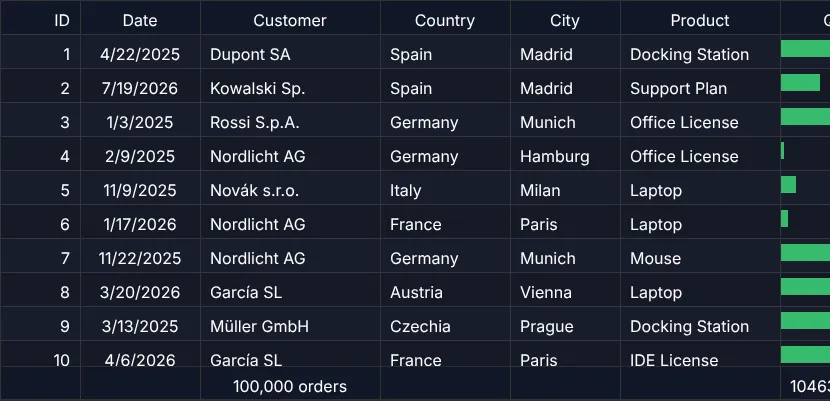
export function applyOrderRenderers(columns: ColumnDefIf[]): void {  const column = (property: keyof Order) => columns.find(c => c.property === property)!;  column("date").rendererMap.body = new DateToLocaleDateCellRenderer();                   // built in  column("quantity").rendererMap.body = new NumberCellProgressBarCellRenderer(20, false); // built in, max 20  column("status").rendererMap.body = new StatusBadgeRenderer();                          // own  column("price").rendererMap.body = new EuroRenderer();                                  // own  column("total").rendererMap.body = new EuroRenderer();  column("total").rendererMap.footer = new EuroRenderer();                                // footer too}
A selection of what the core ships:
| Renderer | Shows |
|---|---|
DateToLocaleDateCellRenderer | a date in the user's locale |
NumberCellProgressBarCellRenderer | a number as bar (maximum, with or without text) |
StarRatingCellRenderer | ★★★☆☆ |
NumberCellRenderer | formatted numbers |
CheckboxCellRenderer | a checkbox for booleans |
ActionsCellRenderer | buttons in a cell |
An own renderer
One method: CellRendererIf.render(). It gets the empty cell div, the position, the area model, the
value and a DomServiceIf to create elements:
import {  type AreaIdent, type AreaModelIf, type CellRendererIf, type DomServiceIf, type RendererCleanupFnType} from "@guiexpert/table";import type { Order } from "./data/orders";
/** Status as a coloured badge – plain DOM, no innerHTML. */export class StatusBadgeRenderer implements CellRendererIf { render(cellDiv: HTMLDivElement, _rowIndex: number, _columnIndex: number, _areaIdent: AreaIdent, _areaModel: AreaModelIf, cellValue: Order["status"], dom: DomServiceIf): RendererCleanupFnType | undefined { const badge = dom.createElement<HTMLSpanElement>("span"); dom.addClass(badge, "status-badge"); dom.addClass(badge, `status-${cellValue}`); // CSS: .status-paid { background: … } badge.textContent = cellValue; dom.appendChild(cellDiv, badge); return undefined; // optional: a cleanup function }}const EUR = new Intl.NumberFormat("de-DE", { style: "currency", currency: "EUR" });
export class EuroRenderer implements CellRendererIf { render(cellDiv: HTMLDivElement, _rowIndex: number, _columnIndex: number, _areaIdent: AreaIdent, _areaModel: AreaModelIf, cellValue: number, dom: DomServiceIf): RendererCleanupFnType | undefined { const label = dom.createElement<HTMLDivElement>("div"); dom.addClass(label, "ge-table-label"); // same padding as a normal cell label.textContent = EUR.format(cellValue); dom.appendChild(cellDiv, label); return undefined; }}.status-badge { display: inline-block; margin-top: 5px; padding: 0 10px; line-height: 20px; border-radius: 10px; }.status-paid { background: #dcfce7; color: #166534; }.status-cancelled { background: #f3f4f6; color: #6b7280; text-decoration: line-through; }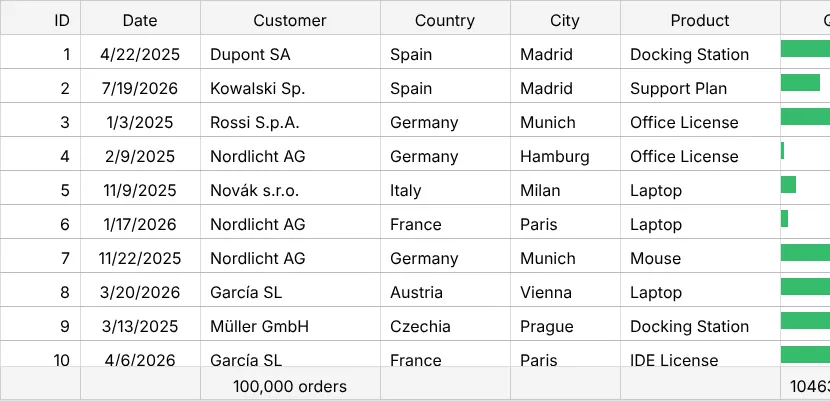
Rules
- Renderers run only for visible cells – and again on every repaint and scroll. Keep them cheap: no
fetch, no heavy computing; prepare values in the model. - Prefer DOM methods over
innerHTML– values may come from users. - Return a
cleanup functionif you attach listeners or timers; it is called before the cell is drawn again. - Per area:
ColumnDefIf.rendererMap.header / .body / .footer, or when creating the column:ColumnDef.create({ …, bodyRenderer: new EuroRenderer() }). - An own area model (the footer of chapter 16 (Footer totals)) chooses renderers itself with
AreaModelIf.getCellRenderer().
More
The showcases Large dataset and Order table combine several built-in renderers.
Next
A real React or Angular component per cell: chapter 26 (Components as cells).