Chapter 20 of 40
Sorting: double-click and own comparators
Locale-aware names, a workflow order for status – and sorting from your own button.
After this chapter you can
- make columns sortable
- write a sortComparator
- sort from code with sortByColumn() and sort()
Double-click on the header
A column with sortable sorts on a double-click on its header:
ascending → descending → ascending … Without a comparator, values are compared with < / > –
fine for numbers and ISO dates, not for names or workflow states.
Own comparators
import { ColumnDef, TrueFn, px110, px120, px180 } from "@guiexpert/table";import type { Order } from "./data/orders";
const STATUS_ORDER: Order["status"][] = ["open", "paid", "shipped", "cancelled"];const rank = (s: Order["status"]) => STATUS_ORDER.indexOf(s);
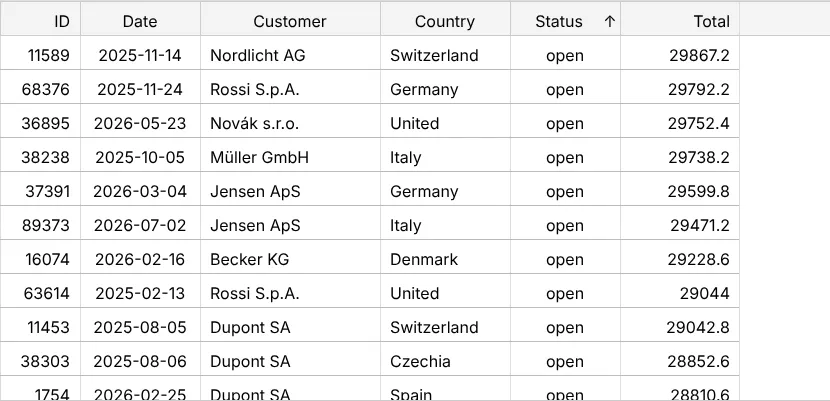
const customer = ColumnDef.create({ property: "customer", headerLabel: "Customer", width: px180, sortable: TrueFn, sortComparator: (a: string, b: string) => a.localeCompare(b, "de") // "Müller" before "Nordlicht"});const status = ColumnDef.create({ property: "status", headerLabel: "Status", width: px110, sortable: TrueFn, sortComparator: (a: Order["status"], b: Order["status"]) => rank(a) - rank(b) // workflow order});const total = ColumnDef.create({ property: "total", headerLabel: "Total", width: px120, sortable: TrueFn, sortState: "desc" // only the icon – see doSort() below});sortComparatorgets two cell values (and the two rows, if you need them) and returns a negative number, 0 or a positive number – likeArray.prototype.sort.localeCompare(b, "de")sorts “Müller” before “Nordlicht” – the default comparison puts umlauts at the end.- A rank array sorts status values in workflow order: open → paid → shipped → cancelled.
Sorted from the start
sortState only sets the arrow in the header. Sort the rows once to match it,
with TableModelIf.doSort() and a SortItem:
const tableModel = TableFactory.createTableModel({ rows: orders, columnDefs });const index = columnDefs.indexOf(total);tableModel.doSort([new SortItem(index, "desc")]); // sort once to match the iconSorting from code
// like a double-click on the header: icon included, without a direction it togglesstatusButton.onclick = () => tableApi.sortByColumn("status");totalButton.onclick = () => tableApi.sortByColumn("total", "desc");
// any comparator on the row objects (clears the header icons – they would not match)newestButton.onclick = () => { tableApi.sort((a: Order, b: Order) => b.date.localeCompare(a.date));});TableApi.sortByColumn()– exactly like a double-click: by property name or column index, with the header icon. Without a direction it toggles;sortByColumn("total", "desc")sets it.TableApi.sort()– any comparator on the row objects, e.g. by two fields. The header icons are cleared, because they would not match.TableApi.reSort()– after data changes (chapter 31 (Inline editing)) apply the last sort again.
Next
chapter 21 (Filtering) – a live search over 100,000 rows.