Chapter 13 of 40
Columns with ColumnDef
Header label, width, alignment, visibility – one ColumnDef per column.
After this chapter you can
- create columns with new ColumnDef() and ColumnDef.create()
- align and size columns
- hide a column
One ColumnDef per column
A ColumnDef describes a column: which property it shows, the header label, the width, CSS classes,
renderers, sorting and editing. Two ways to create one:
new ColumnDef(property, headerLabel, width, classes)– short, for the common case;ColumnDef.create()({ … })– named parameters for everything else.
import {  ColumnDef, type ColumnDefIf, FalseFn, Size, TableFactory,  allRight, bodyLeft, px80, px110, px120, px130, px160, px180, px200} from "@guiexpert/table";import type { Order } from "./data/orders";
export const ORDER_COLUMNS: ColumnDefIf[] = [  new ColumnDef("id", "ID", px80, allRight),                // property, header label, width, CSS classes  new ColumnDef("date", "Date", px120),  new ColumnDef("customer", "Customer", px180, bodyLeft),  new ColumnDef("country", "Country", px130, bodyLeft),  new ColumnDef("city", "City", px110, bodyLeft),  new ColumnDef("product", "Product", px160, bodyLeft),  ColumnDef.create({ property: "category", headerLabel: "Category", isVisible: FalseFn }),  // hidden  new ColumnDef("quantity", "Qty", px80, allRight),  ColumnDef.create({                                        // named parameters for everything else    property: "price", headerLabel: "Price",    width: new Size(8, "%"), minWidth: px80, maxWidth: px200, // 8 % of the table width, at least 80, at most 200 px    headerClasses: ["ge-table-text-align-right"],    bodyClasses: ["ge-table-text-align-right"]  }),  new ColumnDef("status", "Status", px110),  new ColumnDef("total", "Total", px120, allRight)];
With own columns, build the model with TableFactory.buildByTypedRows() (or pass columnDefs to
TableFactory.createTableModel()):
const tableModel = TableFactory.buildByTypedRows<Order>(orders, ORDER_COLUMNS);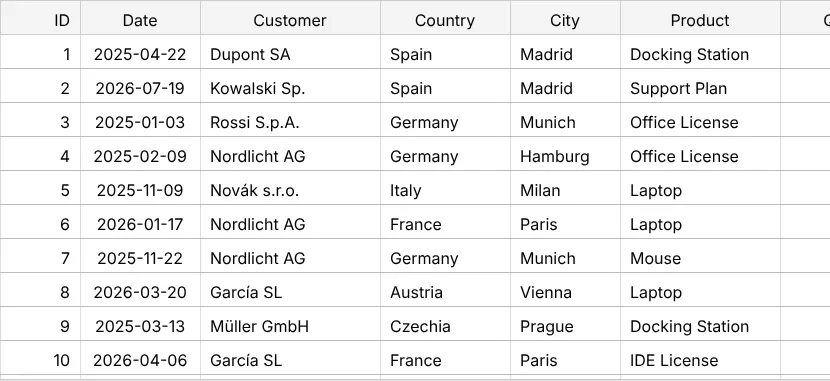
Widths
Widths are Size objects with a unit (SizeUnitType). For pixel values the core exports
constants from px0 to px500 (px80, px100, px120 …); for anything
else use new Size(37, "px"). Without a width a ColumnDef is 100 px wide.
| Unit | Example | Meaning |
|---|---|---|
"px" | px120 | fixed width |
"%" | new Size(8, "%") | share of the table width, clamped by minWidth / maxWidth |
"weight" | new Size(1, "weight") | the space left after px and % columns, split by weight |
minWidth and maxWidth clamp percentage widths and – since 1.1.103 – resizing with the
mouse (chapter 19 (TableOptions)). A pixel width itself is taken as it is. Without them a column has
no limits.
Alignment and CSS classes
The fourth constructor argument maps areas to CSS classes. Ready-made maps:
| Constant | Effect |
|---|---|
bodyLeft / bodyRight | body cells left / right aligned |
allLeft / allRight / allCenter | header, body and footer – use allRight for numbers |
With ColumnDef.create pass headerClasses, bodyClasses, footerClasses – any class of
your own stylesheet works, e.g. ["ge-table-text-align-right", "num"].
Hide a column
ColumnDef.create({ property: "category", headerLabel: "Category", isVisible: FalseFn })
ColumnDefIf.isVisible is a function – it may also depend on state (() => showDetails), followed
by TableApi.repaint(). Hidden columns are not copied and not exported (chapter 24 (Excel export)).
At runtime – e.g. from a “visible columns” menu – use TableApi.setColumnVisible() with the property;
it sets isVisible for you and remembers the width for when the column comes back:
tableApi.setColumnVisible("category", false); // by property – no index neededtableApi.isColumnVisible("category"); // falseThe hidden columns can be remembered across reloads (chapter 33 (Persist state)).
Everything a ColumnDef can do
| Field | Chapter |
|---|---|
sortable, sortComparator, sortState | chapter 20 (Sorting) |
headerRenderer, bodyRenderer, footerRenderer (rendererMap) | chapter 25 (Cell renderers) |
editable, editInputPipe, getEditRenderer, validate | chapter 31 (Inline editing) |
valueGetter, valueSetter, showValuesAs, formula | chapter 39 (Calculated columns & formulas) |
rowDrag | chapter 23 (Events & context menu) |
Next
No objects at all, just rows of strings: chapter 14 (Array of arrays).