Chapter 39 of 40
Calculated columns, “Show values as” and formulas
Net, VAT, gross, share of the total and rank – computed when a cell becomes visible, without touching the data, and still sortable, filterable and exportable.
After this chapter you can
- add a calculated column with valueGetter
- read other columns and column totals in a getter
- show values as shares, running totals and ranks
- let users type formulas – safely, without eval
- know where computed values are used: sorting, filter, totals, copy, Excel
Computed, not stored
Your orders have a quantity and a price. The table should also show the net amount, the gross amount with VAT, the
share of each order in the total and its rank. You could add these fields to every object – and keep them right after
every edit, every filter and every new delivery from the server. Or the column computes them when a
cell becomes visible. Since @guiexpert/table@1.1.95 there are three tools for that – MIT-licensed:
- calculated columns – a
valueGetterfunction per column; - “Show values as” – a value shown as a share, running total, difference or rank;
- formulas – a text like
ROUND([net] * 1.19, 2)that your users can type.
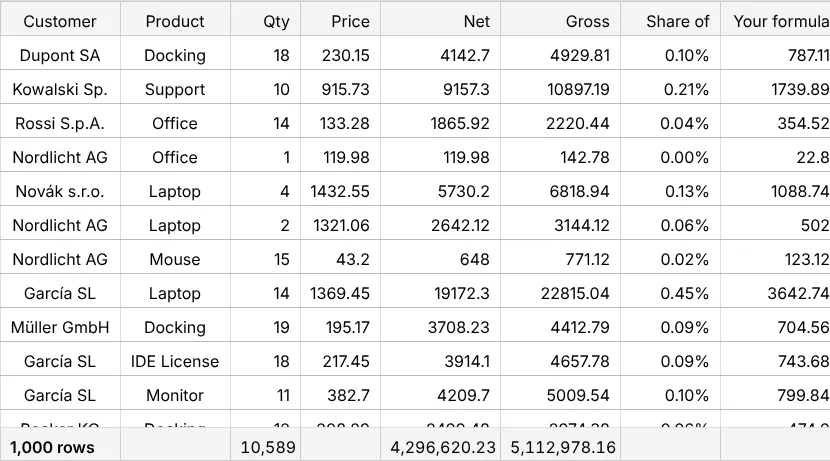
valueGetter: one function per column
ColumnDefIf.valueGetter gets the row and returns the value. property stays the id of the
column – it does not have to exist in the data:
const columnDefs: ColumnDefIf[] = [ ColumnDef.create({ property: "customer", headerLabel: "Customer", width: px120 }), ColumnDef.create({ property: "product", headerLabel: "Product", width: px110 }), ColumnDef.create({ property: "quantity", headerLabel: "Qty", width: px70, ...right }), ColumnDef.create({ property: "price", headerLabel: "Price", width: px80, ...right }), ColumnDef.create({ // a function: fast, typed, your code property: "net", headerLabel: "Net", width: px120, ...right, valueGetter: (o: Order) => Math.round(o.quantity * o.price * 100) / 100 }), ColumnDef.create({ // a formula: a text – could come from your users property: "gross", headerLabel: "Gross", width: px120, ...right, formula: "ROUND([net] * 1.19, 2)" }), ColumnDef.create({ // the same value, shown as a share of the column total property: "share", headerLabel: "Share of net", width: px100, ...right, valueGetter: (o: Order, c) => c.getValue(o, "net"), showValuesAs: { mode: "percentOfColumnTotal", fractionDigits: 2 } }), ColumnDef.create({ property: "custom", headerLabel: "Your formula", width: px120, ...right, formula: 'IF([quantity] >= 10, "bulk", "single")' })];const tableModel = TableFactory.createTableModel({ rows: orders, columnDefs, footerAggregates: { quantity: "sum", net: "sum", gross: "sum" } // sums of the computed values});The important part is where the value is used – everywhere the table reads a cell:
- sorting (a click on “Net” sorts by the computed value), copy, Excel export;
- the total row:
footerAggregates: { net: "sum" }sums the computed values (chapter 16 (Footer totals)), row grouping can group and aggregate by them (chapter 36 (Row grouping)); - other calculated columns: the second parameter (
ValueGetterContextIf) reads them withValueGetterContextIf.getValue(), column totals over the filtered rows withValueGetterContextIf.aggregate()(cached).
The filter function gets your row object – read a computed value with TableApi.getRowValue():
tableOptions.externalFilterFunction = (o: Order) => Number(tableApi.getRowValue(o, "gross")) > 1000;Show values as: shares, running totals, ranks
The column “Share of net” has the same value as “Net” – it is only shown differently.
ColumnDefIf.showValuesAs knows seven modes (ShowValuesAs):
percentOfColumnTotal,percentOfGrandTotal,percentOfParentTotal(per group in a tree or row grouping),percentOfRowTotal(pivot);runningTotal,differenceFromPrevious,rank(1 = largest).
const modes: ShowValuesAs[] = ["percentOfColumnTotal", "runningTotal", "rank"];const label: Record<string, string> = { percentOfColumnTotal: "share", runningTotal: "running total", rank: "rank" };let mode = 0;ctx.button("net as → running total", button => { mode = (mode + 1) % modes.length; api.setShowValuesAs("share", { mode: modes[mode], fractionDigits: 2 }); button.textContent = `net as → ${label[modes[(mode + 1) % modes.length]]}`;});
The reference is always the filtered rows, like the total row: switch on “only Germany” and the
visible shares add up to 100 % again. Sorting uses the raw value; Excel gets the shares as numbers with the format
0.0%. In a pivot table, every value can have its own mode (chapter 37 (Pivot tables)).
const tableOptions: TableOptionsIf = { ...new TableOptions(), externalFilterFunction: (o: Order) => !onlyGermany || o.country === "Germany"};Formulas your users can type
A formula column is a calculated column whose getter is compiled from a text. Fields are written in brackets, the functions look like a spreadsheet:
ColumnDef.create({ property: "gross", formula: "ROUND([net] * 1.19, 2)" })ColumnDef.create({ property: "margin", formula: "IF([net] = 0, 0, ([net] - [cost]) / [net])" })ColumnDef.create({ property: "share", formula: "ROUND([net] / SUM([net]) * 100, 1)" }) // SUM over the columnAt runtime – e.g. from an input field of your app – TableApi.setColumnFormula() compiles and repaints:
const hint = `functions: ${FORMULA_FUNCTION_NAMES.slice(0, 8).join(", ")} …`;const input = ctx.search("formula, e.g. [gross] - [net]", source => { const error = api.setColumnFormula("custom", source || '""'); // compiled, no eval – repaints the column ctx.info(error ? `${error.code} ${error.message}` : hint);});- Functions:
ROUND,ABS,IF,IFERROR,AND,OR,CONCAT,UPPER… (FORMULA_FUNCTION_NAMES), column aggregatesSUM([x]),AVG,MIN,MAX,COUNT– and your own functions viaformulaOptions: { functions: { VAT: net => Number(net) * 0.19 } }. - Errors are values, not exceptions:
#DIV/0!,#NAME?(unknown field),#VALUE!,#CIRC!(a column that uses itself) – shown in red with the message as tooltip, sorted last, skipped by totals. Test it withcompileFormulaandisFormulaError. - Math, not Excel:
-2^2is-4;ROUNDrounds half away from zero.
What it is not
There are no cell references like =B2*C2: with sorting, filtering and virtual scrolling, positions change
all the time – a formula refers to fields of the same row and to column totals. There is no built-in formula editor;
the input field belongs to your app. Compare with the alternatives: chapter 3 (Build, buy or GuiExpert?).
Next
Back to the overview of all chapters, or the checklist for your own table: chapter 34 (Checklist & finale).
API used in this chapter
ColumnDefIf.valueGetterValueGetterContextIfValueGetterContextIf.getValue()ValueGetterContextIf.aggregate()ColumnDefIf.showValuesAsShowValuesAsTableApi.setShowValuesAs()ColumnDefIf.formulaTableApi.setColumnFormula()compileFormulaFormulaErrorisFormulaErrorFORMULA_FUNCTION_NAMESTableApi.getRowValue()ColumnDefIf.valueSetter